i18n - 使用 Crowdin
Docusaurus 的 i18n 系统是与任何翻译软件解耦的。
只要您将翻译文件放在正确的位置,就可以将 Docusaurus 与您选择的工具和 SaaS 集成。
我们以 Crowdin 为例记录了一种可能的集成方式。
这并不是对 Crowdin 的唯一选择的背书,但它已成功用于翻译 Facebook 的文档项目,如 Jest、Docusaurus 和 ReasonML。
请参考 Crowdin 文档 和 Crowdin 支持 以获取帮助。
使用这个**社区驱动的 GitHub 讨论**来讨论与 Docusaurus + Crowdin 相关的任何内容。
Crowdin 概述
Crowdin 是一个翻译 SaaS,为开源项目提供免费计划。
我们推荐以下翻译工作流程:
- 上传源文件到 Crowdin(未翻译的文件)
- 使用 Crowdin 翻译内容
- 从 Crowdin 下载翻译(本地化的翻译文件)
Crowdin 提供了一个 CLI 来上传源文件和下载翻译,允许您自动化翻译过程。
crowdin.yml 配置文件对 Docusaurus 很方便,并允许在预期位置下载本地化的翻译文件(在 i18n/[locale]/..)。
阅读**官方文档**以了解更多高级功能和不同的翻译工作流程。
Crowdin 教程
这是使用 Crowdin 将新初始化的英文 Docusaurus 网站翻译成法语的演练,假设您已经按照 i18n 教程 进行了操作。
最终结果可以在 docusaurus-crowdin-example.netlify.app(仓库)看到。
准备 Docusaurus 站点
初始化一个新的 Docusaurus 站点:
npx create-docusaurus@latest website classic
添加法语语言的站点配置:
export default {
  i18n: {
    defaultLocale: 'en',
    locales: ['en', 'fr'],
  },
  themeConfig: {
    navbar: {
      items: [
        // ...
        {
          type: 'localeDropdown',
          position: 'left',
        },
        // ...
      ],
    },
  },
  // ...
};
翻译主页:
import React from 'react';
import Translate from '@docusaurus/Translate';
import Layout from '@theme/Layout';

export default function Home() {
  return (
    <Layout>
      <h1 style={{margin: 20}}>
        <Translate description="The homepage main heading">
          Welcome to my Docusaurus translated site!
        </Translate>
      </h1>
    </Layout>
  );
}
创建 Crowdin 项目
在 Crowdin 上注册,并创建一个项目。
使用英语作为源语言,法语作为目标语言。
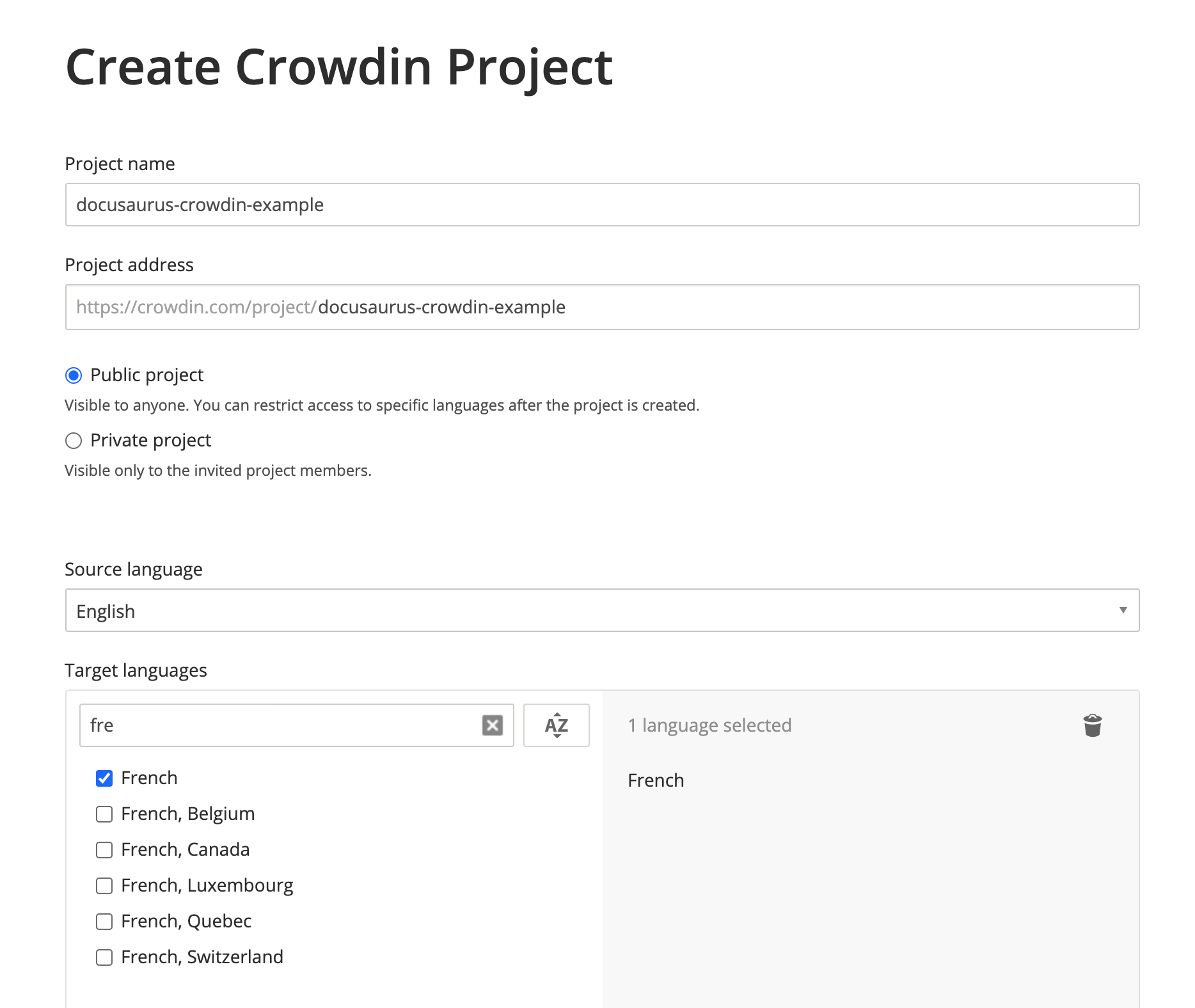
您的项目已创建,但目前是空的。我们将在接下来的步骤中上传要翻译的文件。
创建 Crowdin 配置
这个配置(文档)为 Crowdin CLI 提供了映射:
- 在哪里找到要上传的源文件(JSON 和 Markdown)
- 翻译后在哪里下载文件(在
i18n/[locale])
在 website 中创建 crowdin.yml:
project_id: '123456'
api_token_env: CROWDIN_PERSONAL_TOKEN
preserve_hierarchy: true
files:
  # JSON 翻译文件
  - source: /i18n/en/**/*
    translation: /i18n/%two_letters_code%/**/%original_file_name%
  # 文档 Markdown 文件
  - source: /docs/**/*
    translation: /i18n/%two_letters_code%/docusaurus-plugin-content-docs/current/**/%original_file_name%
  # 博客 Markdown 文件
  - source: /blog/**/*
    translation: /i18n/%two_letters_code%/docusaurus-plugin-content-blog/**/%original_file_name%
Crowdin 有自己的语法来声明源/翻译路径:
**/*:子文件夹中的所有内容%two_letters_code%:Crowdin 目标语言的 2 个字母变体(我们的例子中是fr)**/%original_file_name%:翻译将保留原始文件夹/文件层次结构
Crowdin CLI 警告并不总是容易理解。
我们建议:
- 一次只改变一件事
- 在任何配置更改后重新上传源文件
- 使用以
/开头的路径(./不起作用) - 避免使用复杂的通配符模式,如
/docs/**/*.(md|mdx)(不起作用)
访问令牌
api_token_env 属性定义了 Crowdin CLI 读取的环境变量名称。
您可以在个人资料页面获取 个人访问令牌。
您可以保留默认值 CROWDIN_PERSONAL_TOKEN,并在计算机和 CI 服务器上将此环境变量设置为生成的访问令牌。
个人访问令牌授予对所有 Crowdin 项目的读写访问权限。
您不应该提交它,最好创建一个专门的公司 Crowdin 配置文件,而不是使用个人帐户。
其他配置字段
project_id:可以硬编码,位于https://crowdin.com/project/<MY_PROJECT_NAME>/settings#apipreserve_hierarchy:在 Crowdin UI 上保留文档的文件夹层次结构,而不是将所有内容展平
安装 Crowdin CLI
本教程使用 CLI 版本 3.5.2,但我们预计 3.x 版本将继续工作。
将 Crowdin CLI 作为 npm 包安装到您的 Docusaurus 站点:
- npm
- Yarn
- pnpm
- Bun
npm install @crowdin/cli@3
yarn add @crowdin/cli@3
pnpm add @crowdin/cli@3
bun add @crowdin/cli@3
添加 crowdin 脚本:
{
  "scripts": {
    // ...
    "write-translations": "docusaurus write-translations",
    "crowdin": "crowdin"
  }
}
Test that you can run the Crowdin CLI:
- npm
- Yarn
- pnpm
- Bun
npm run crowdin -- --version
yarn crowdin --version
pnpm run crowdin --version
bun run crowdin --version
Set the CROWDIN_PERSONAL_TOKEN env variable on your computer, to allow the CLI to authenticate with the Crowdin API.
Temporarily, you can hardcode your personal token in crowdin.yml with api_token: 'MY-TOKEN'.
Upload the sources
Generate the JSON translation files for the default language in website/i18n/en:
- npm
- Yarn
- pnpm
- Bun
npm run write-translations
yarn write-translations
pnpm run write-translations
bun run write-translations
Upload all the JSON and Markdown translation files:
- npm
- Yarn
- pnpm
- Bun
npm run crowdin upload
yarn crowdin upload
pnpm run crowdin upload
bun run crowdin upload
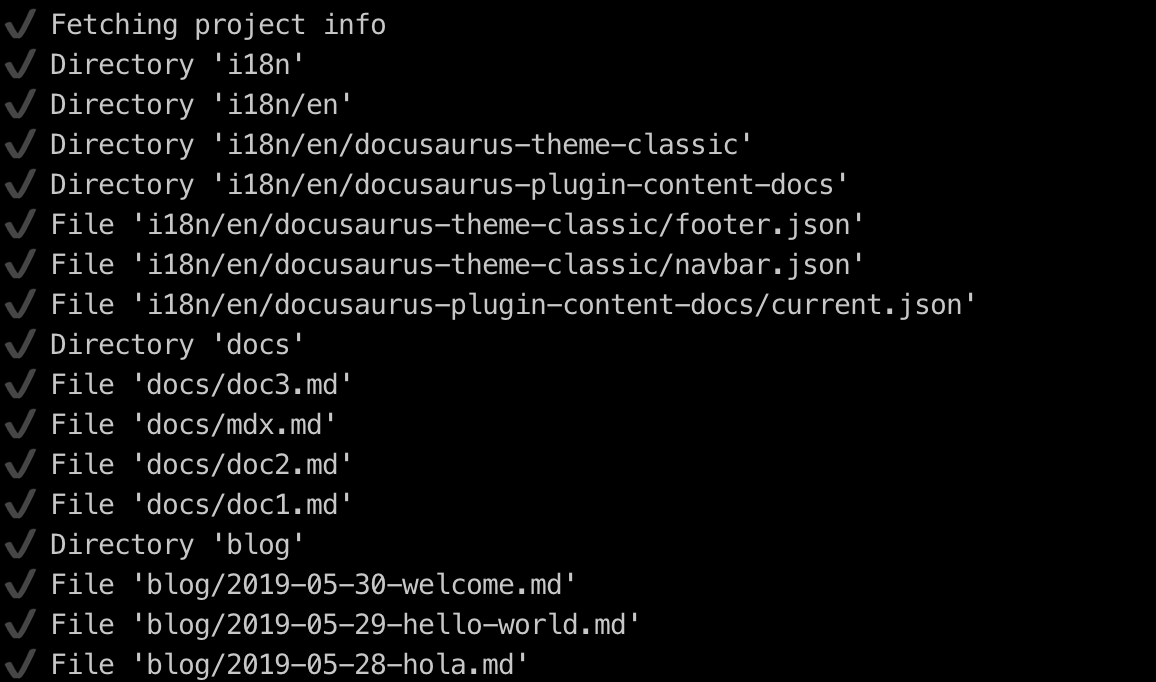
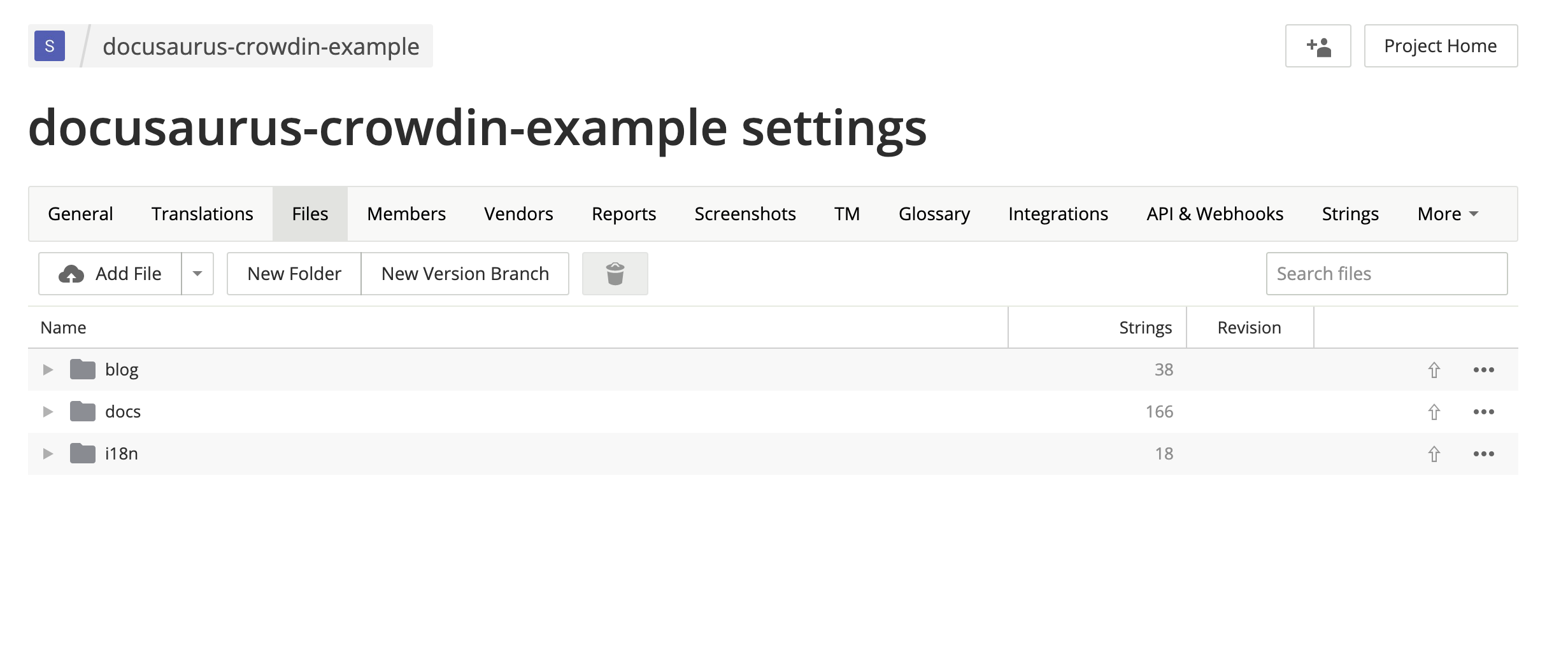
Your source files are now visible on the Crowdin interface: https://crowdin.com/project/<MY_PROJECT_NAME>/settings#files
Translate the sources
On https://crowdin.com/project/<MY_PROJECT_NAME>, click on the French target language.
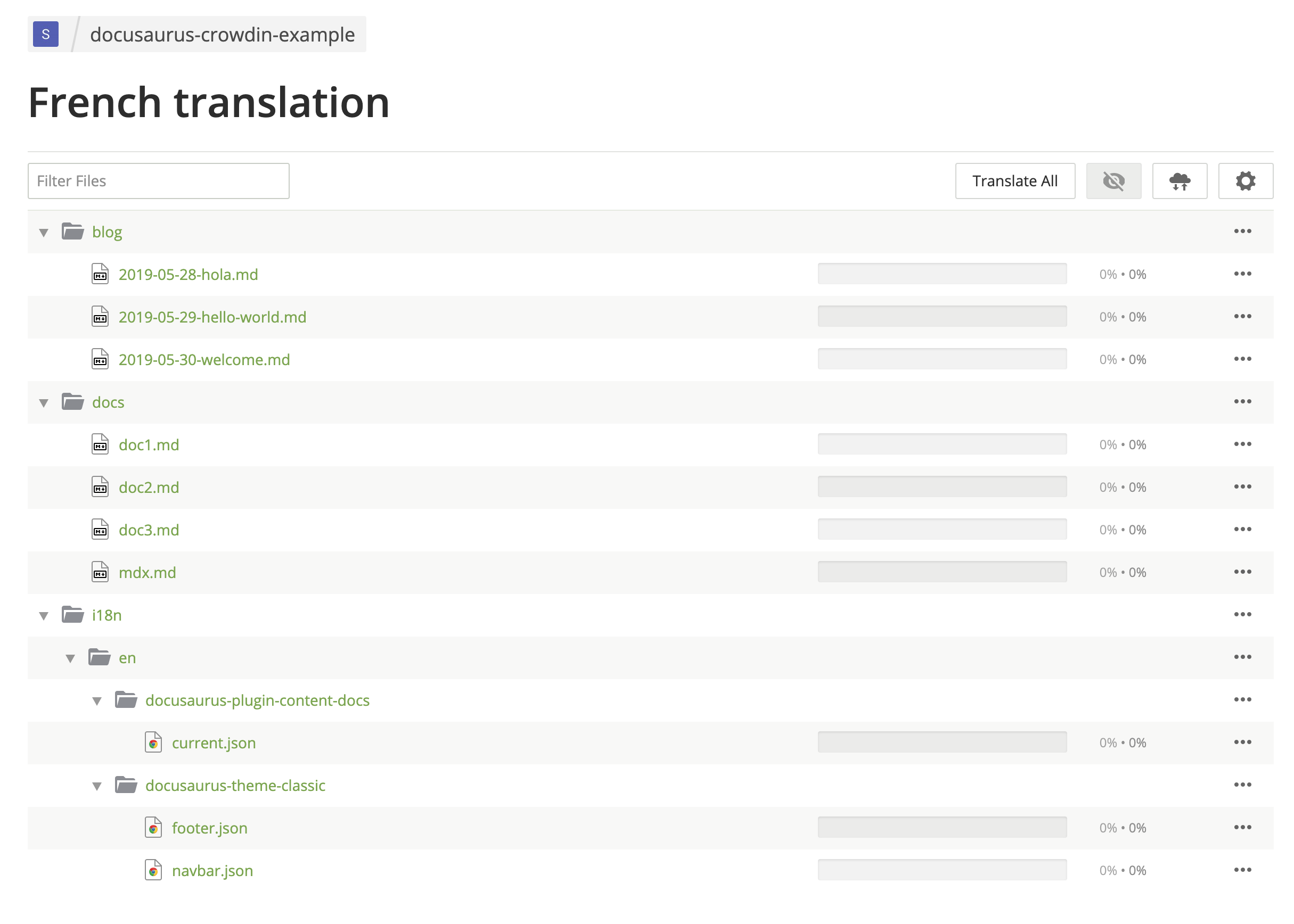
Translate some Markdown files.
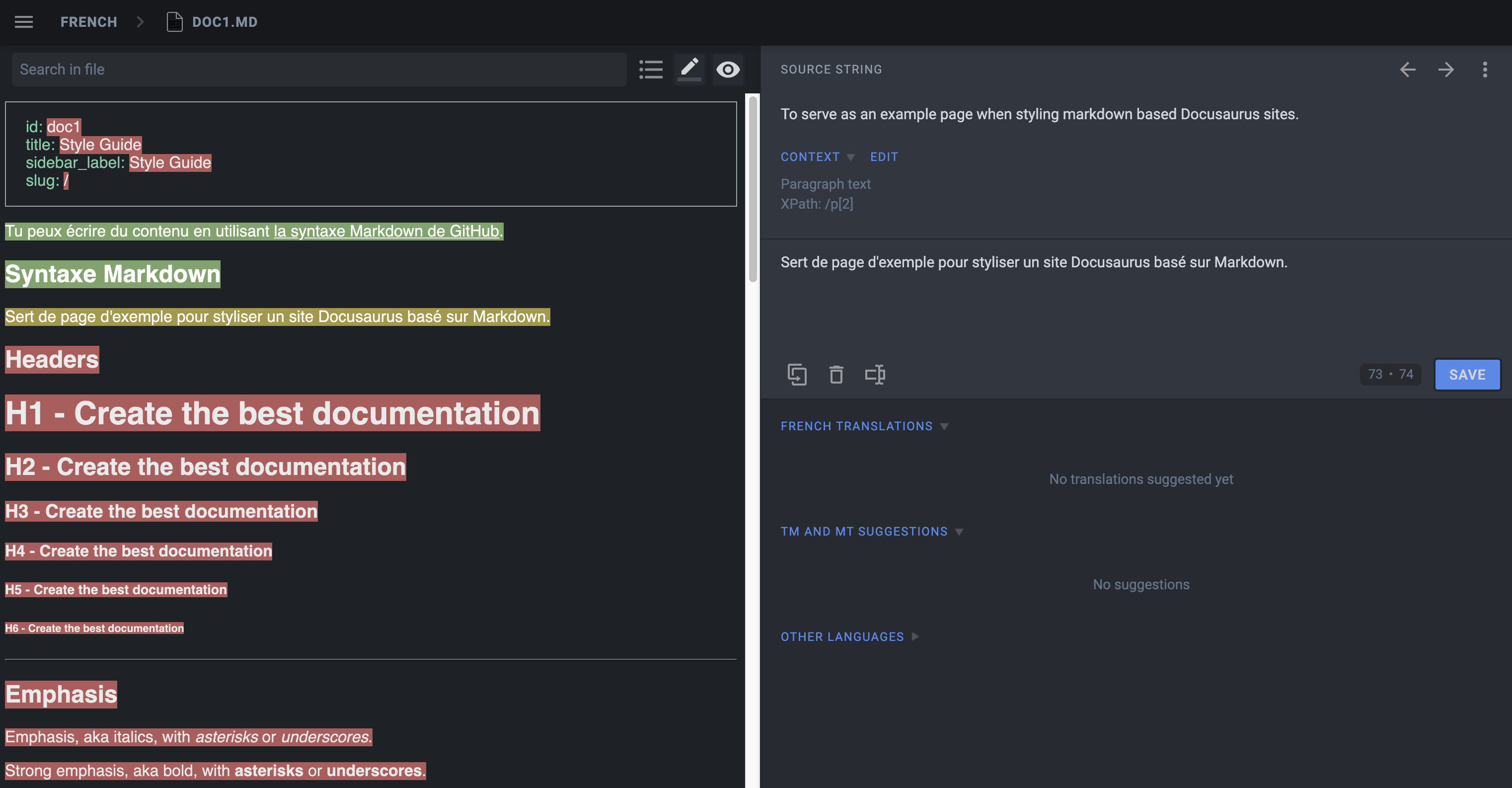
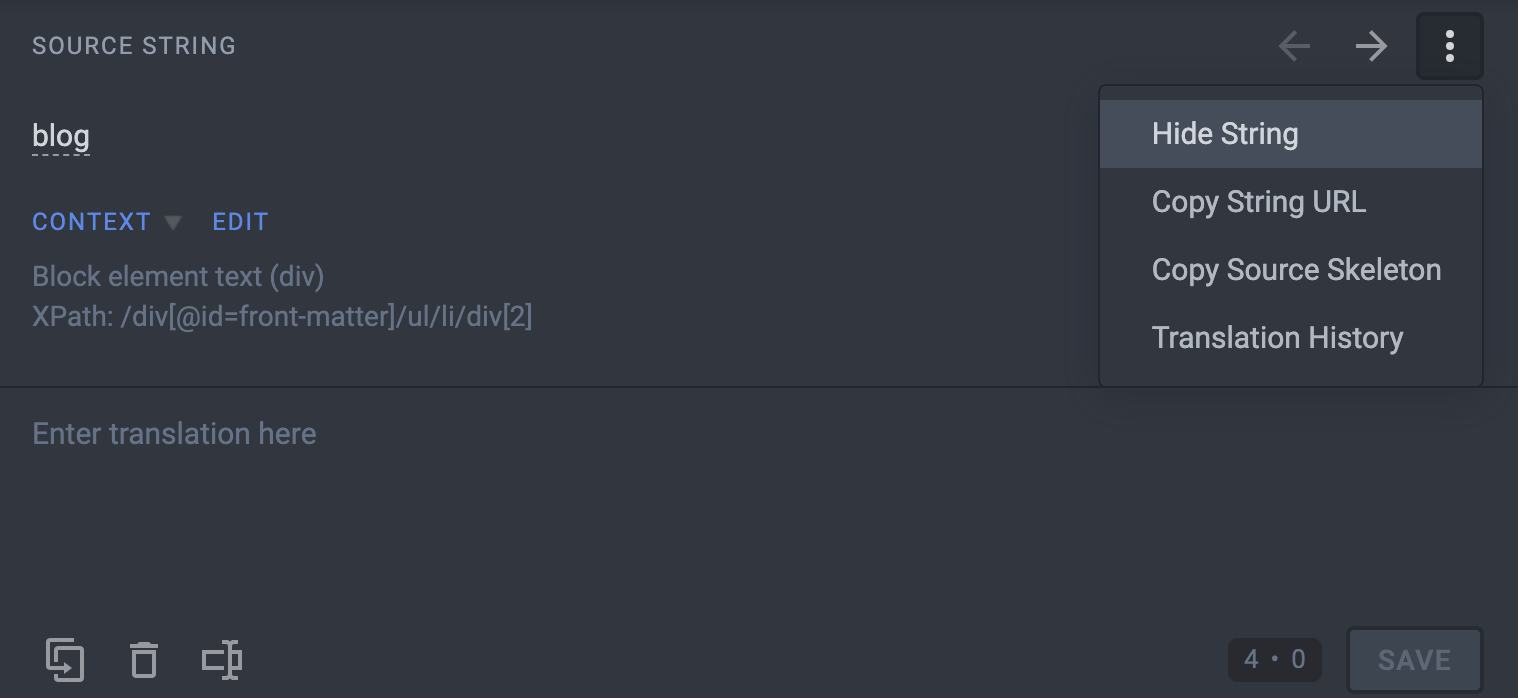
Use Hide String to make sure translators don't translate things that should not be:
- Front matter:
id,slug,tags... - Admonitions:
:::,:::note,:::tip...
Translate some JSON files.
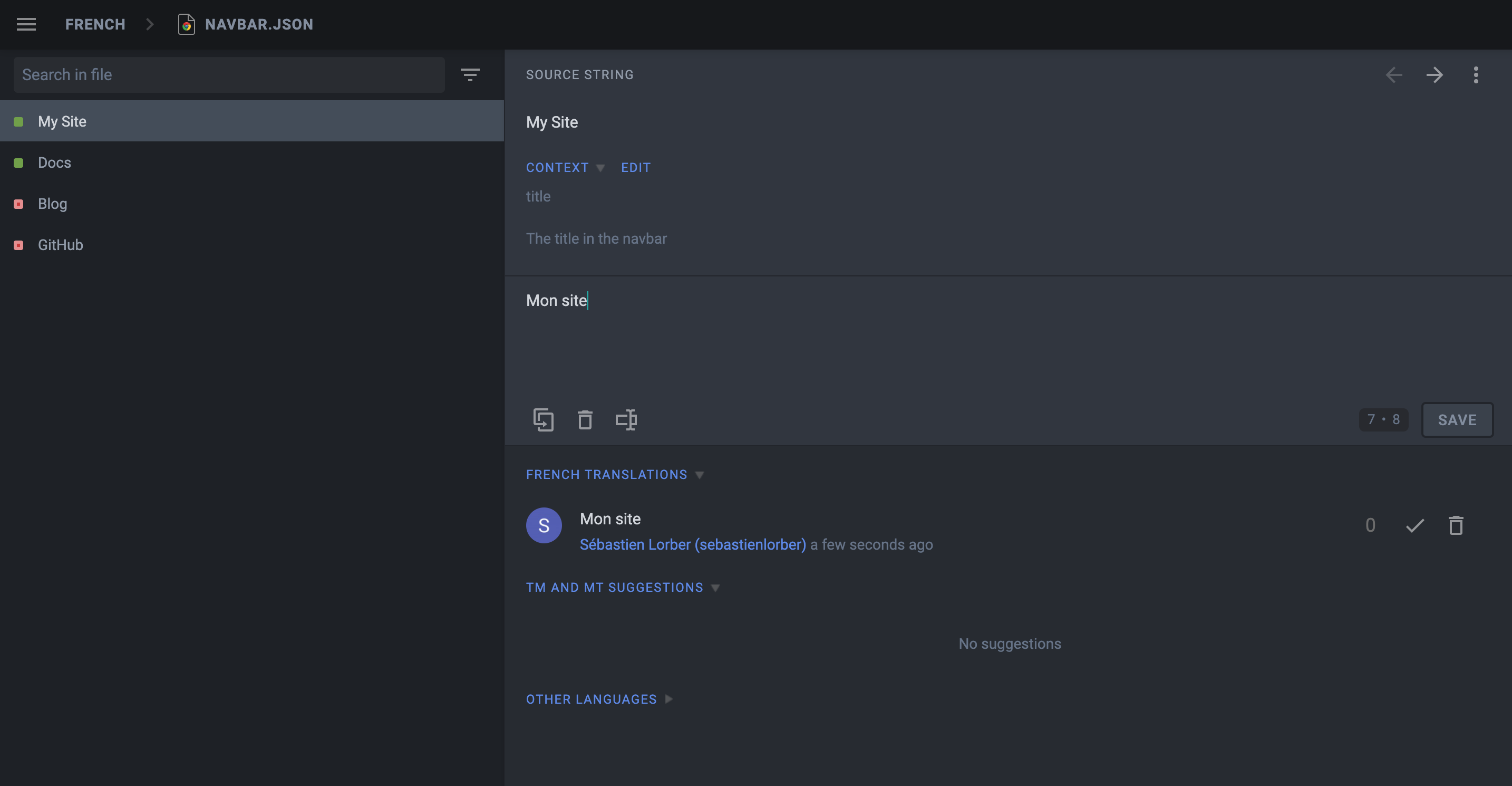
The description attribute of JSON translation files is visible on Crowdin to help translate the strings.
Pre-translate your site, and fix pre-translation mistakes manually (enable the Global Translation Memory in settings first).
Use the Hide String feature first, as Crowdin is pre-translating things too optimistically.
Download the translations
Use the Crowdin CLI to download the translated JSON and Markdown files.
- npm
- Yarn
- pnpm
- Bun
npm run crowdin download
yarn crowdin download
pnpm run crowdin download
bun run crowdin download
The translated content should be downloaded in i18n/fr.
Start your site on the French locale:
- npm
- Yarn
- pnpm
- Bun
npm run start -- --locale fr
yarn run start --locale fr
pnpm run start --locale fr
bun run start --locale fr
Make sure that your website is now translated in French at http://localhost:3000/fr/.
Automate with CI
We will configure the CI to download the Crowdin translations at build time and keep them outside of Git.
Add website/i18n to .gitignore.
Set the CROWDIN_PERSONAL_TOKEN env variable on your CI.
Create an npm script to sync Crowdin (extract sources, upload sources, download translations):
{
  "scripts": {
    "crowdin:sync": "docusaurus write-translations && crowdin upload && crowdin download"
  }
}
Call the npm run crowdin:sync script in your CI, just before building the Docusaurus site.
Keep your deploy-previews fast: don't download translations, and use npm run build -- --locale en for feature branches.
Crowdin does not support well multiple concurrent uploads/downloads: it is preferable to only include translations to your production deployment, and keep deploy previews untranslated.
Advanced Crowdin topics
MDX
请特别注意 MDX 文档中的 JSX 片段!
Crowdin 不正式支持 MDX,但他们添加了对 .mdx 扩展名的支持,并将此类文件解释为 Markdown(而不是纯文本)。
MDX 问题
Crowdin 认为 JSX 语法是嵌入的 HTML,并且在下载翻译时可能会破坏 JSX 标记,导致站点由于无效的 JSX 而无法构建。
简单的 JSX 片段(使用简单的字符串 props,如 <Username name="Sebastien"/>)将正常工作;使用对象/数组 props 的更复杂的 JSX 片段(如 <User person={{name: "Sebastien"}}/> )更可能因语法不像 HTML 而失败。
MDX 解决方案
我们建议将复杂的嵌入式 JSX 代码提取为单独的独立组件。我们还添加了一个 mdx-code-block 转义语法:
# 如何部署 Docusaurus

要部署 Docusaurus,请运行以下命令:


import Tabs from '@theme/Tabs';

import TabItem from '@theme/TabItem';

<Tabs>
  <TabItem value="bash" label="Bash">

  ```bash
  GIT_USER=<GITHUB_USERNAME> yarn deploy
  ```

  </TabItem>
  <TabItem value="windows" label="Windows">

  ```batch
  cmd /C "set "GIT_USER=<GITHUB_USERNAME>" && yarn deploy"
  ```

  </TabItem>
</Tabs>
这将:
- 被 Crowdin 解释为代码块(并且在下载时不会破坏标记)
- 被 Docusaurus 解释为常规 JSX(就像没有被任何代码块包装一样)
- 不幸的是,会选择退出 MDX 工具(IDE 语法高亮、Prettier...)
文档版本控制
为 website/versioned_docs 文件夹配置翻译文件。
创建新版本时,源字符串通常与当前版本(website/docs)非常相似,您不希望一次又一次地翻译新版本的文档。
Crowdin 提供了一个 重复字符串 设置。
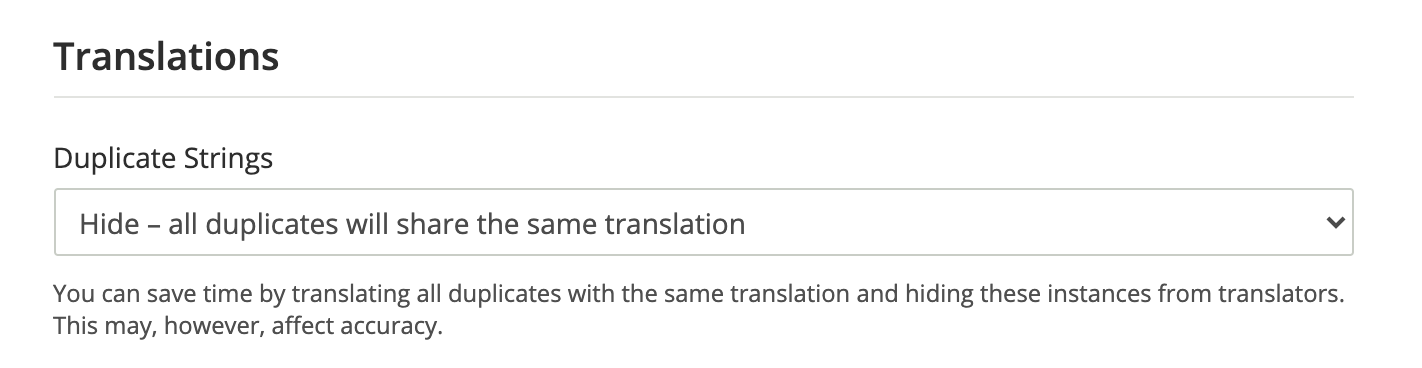
我们建议使用 隐藏,但理想的设置取决于您的版本有多大不同。
不使用 隐藏 会导致配额中 源字符串 数量大大增加,并会影响定价。
多实例插件
您需要为每个插件实例配置翻译文件。
如果您有一个带有 id=ios 的文档插件实例,您还需要配置这些源文件
website/ioswebsite/ios_versioned_docs(如果有版本)
维护您的站点
有时,您将在 Git 上删除或重命名源文件,Crowdin 将显示 CLI 警告:
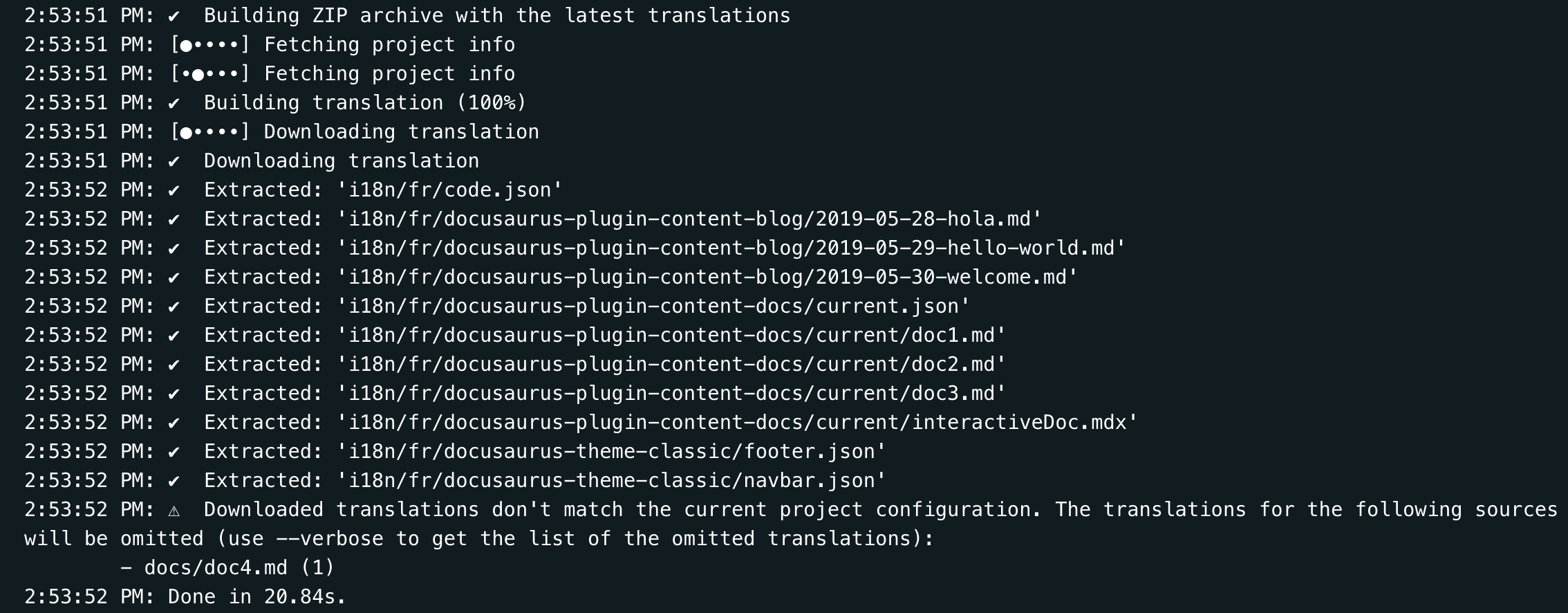
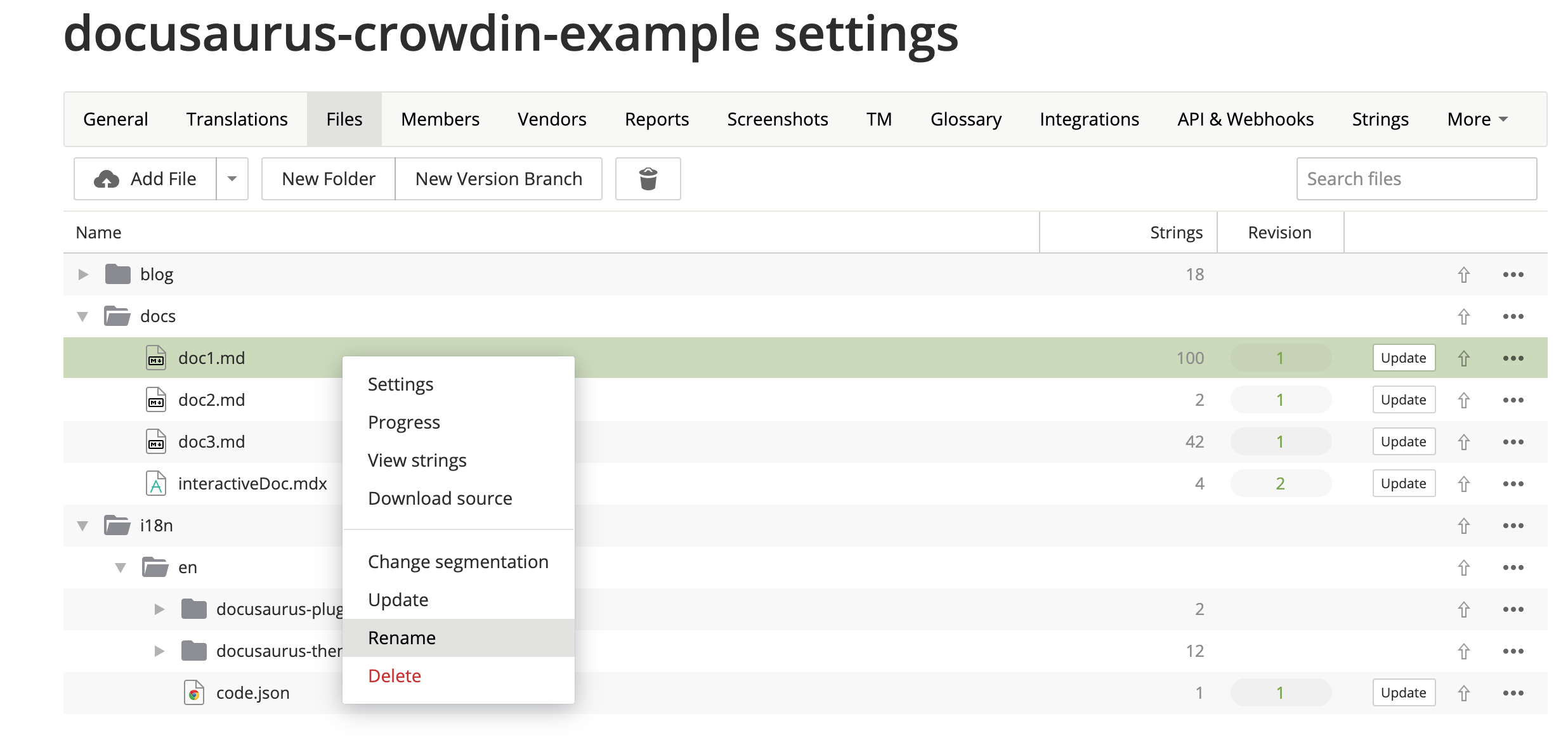
当您的源文件被重构时,您应该使用 Crowdin UI 手动更新您的 Crowdin 文件:
VCS(Git)集成
Crowdin 为 GitHub、GitLab、Bitbucket 提供了多种 VCS 集成。
我们建议避免使用它们。
本可以帮助在 Git 和 Crowdin 中同时编辑翻译,并在两个系统之间进行双向同步。
实际上,它并不能可靠地工作,原因如下:
- Crowdin -> Git 同步工作正常(通过拉取请求)
- Git -> Crowdin 同步是手动的(您必须按下按钮)
- Crowdin 用于匹配现有 Markdown 翻译和现有 Markdown 源的启发式方法并不 100% 可靠,在任何 Git 同步后,您必须在 Crowdin UI 上验证结果
- 在 Git 和 Crowdin 上同时编辑的两个用户可能导致翻译丢失
- 它要求
crowdin.yml文件位于仓库的根目录
上下文本地化
Crowdin 有一个上下文本地化功能。
出于技术原因,它目前还不能正常工作,但我们对解决它抱有很大希望。
Crowdin 将 Markdown 字符串替换为诸如 crowdin:id12345 之类的技术 ID,但这样做太过激进,包括隐藏的字符串,并且会破坏前置内容、警告框、JSX 等。
本地化编辑 URL
当用户浏览 /fr/doc1 页面时,默认情况下,编辑按钮将链接到未本地化的文档 website/docs/doc1.md。
您可能更希望编辑按钮链接到 Crowdin 界面,方法是使用 editUrl 函数自定义每个语言环境的编辑 URL。
const DefaultLocale = 'en';

export default {
  presets: [
    [
      '@docusaurus/preset-classic',
      {
        docs: {
          editUrl: ({locale, versionDocsDirPath, docPath}) => {
            // 为法语文档链接到 Crowdin
            if (locale !== DefaultLocale) {
              return `https://crowdin.com/project/docusaurus-v2/${locale}`;
            }
            // 为英文文档链接到 GitHub
            return `https://github.com/facebook/docusaurus/edit/main/website/${versionDocsDirPath}/${docPath}`;
          },
        },
        blog: {
          editUrl: ({locale, blogDirPath, blogPath}) => {
            if (locale !== DefaultLocale) {
              return `https://crowdin.com/project/docusaurus-v2/${locale}`;
            }
            return `https://github.com/facebook/docusaurus/edit/main/website/${blogDirPath}/${blogPath}`;
          },
        },
      },
    ],
  ],
};
目前无法链接到 Crowdin 中的特定文件。
示例配置
Docusaurus 配置文件是使用版本控制和多实例的好例子:
project_id: "docusaurus-v2"
api_token_env: "CROWDIN_PERSONAL_TOKEN"
preserve_hierarchy: true
commit_message: "New translations %file_name% (%language%)"
append_commit_message: false
languages_mapping: &languages_mapping
  two_letters_code:
    pt-BR: pt-BR
files:
  - source: "/website/docs/**/*.md"
    translation: "/website/i18n/%locale%/docusaurus-plugin-content-docs/current/**/%original_file_name%"
  - source: "/website/docs/**/*.mdx"
    translation: "/website/i18n/%locale%/docusaurus-plugin-content-docs/current/**/%original_file_name%"
  - source: /website/i18n/en/**/*
    translation: /website/i18n/%two_letters_code%/**/%original_file_name%
    languages_mapping: *languages_mapping
  - source: /website/docs/**/*
    translation: /website/i18n/%two_letters_code%/docusaurus-plugin-content-docs/current/**/%original_file_name%
    languages_mapping: *languages_mapping
  - source: /website/community/**/*
    translation: /website/i18n/%two_letters_code%/docusaurus-plugin-content-docs-community/current/**/%original_file_name%
    languages_mapping: *languages_mapping
  - source: /website/versioned_docs/**/*
    translation: /website/i18n/%two_letters_code%/docusaurus-plugin-content-docs/**/%original_file_name%
    languages_mapping: *languages_mapping
  - source: /website/blog/**/*
    translation: /website/i18n/%two_letters_code%/docusaurus-plugin-content-blog/**/%original_file_name%
    languages_mapping: *languages_mapping
  - source: /website/src/pages/**/*
    translation: /website/i18n/%two_letters_code%/docusaurus-plugin-content-pages/**/%original_file_name%
    ignore: [/**/*.js, /**/*.jsx, /**/*.ts, /**/*.tsx, /**/*.css]
    languages_mapping: *languages_mapping
机器翻译(MT)问题:链接/图像处理
Crowdin 最近对 Markdown 文件格式进行了重大更改,现在链接的处理方式与之前不同。之前它们被视为标签,但现在它们显示为纯文本。由于这些更改,纯文本链接被传递给机器翻译引擎,该引擎会尝试翻译目标,从而破坏翻译(例如:字符串 Allez voir [ma merveilleuse page](/ma-merveilleuse-page) 被翻译为 Check out [my wonderful page](/my-wonderful-page),这破坏了 Docusaurus i18n 工作流,因为页面名称不应被翻译)。
截至 2023 年 12 月 7 日,他们不打算更改链接处理的逻辑,所以如果您计划将 Crowdin 与机器翻译一起使用,请记住这一点。